Made in USA
The Embedded Solutions Experts

PCIeBPMCX1
PCIe adapter for PMC



PCIeBPMCX1 Description
- Industrial Temperature
- PCIe 1-4 Lane Interface
- PMC position with PCI interface supporting PCI and PCI-X [32/33 <=> 64/133]
- Plug and Play operation
- Local Power Supply for 3.3, 5 and -12V Operating from System +12V
- 1/2 Length PCIe Card
- "Zero Slot Fan"™ Compatible
- Bezel I/O and Jn4 I/O for PMC
- 1 Year Warranty Standard. Extended Warranty Available.
- ROHS and Standard Processing Available
Use your PMC with a new PC. PCs have PCI Express connectors in larger quantities than PCI slots. The PCIeBPMCX1 ( PCIe Bridge PMC 1 slot) adapter / carrier converter card provides the ability to install one PMC card into a standard PCIe (Express) 4 lane slot. Suitable for PCI or PCI-X operation with the PMC; 32 bit or 64 bit data and PCI (25, 33, 50, 66) or PCI-X (50,66,100,133) MHz. clock. Auto selected or switch programmable speeds. The bridge can operate with 1, 2, 3 or 4 lanes active, and can be installed into slots with more than 4 lanes if desired. Over 5000 shipped.
The PMC user IO connector Pn4 is available on a SCSI II connector. The Pn4 "user IO" is routed differentially with matched length and impedance control to the SCSI connector. The PMC front panel connector is mounted though the PCIe mounting bracket.
For superior performance, PCIeBPMCX1 has dual cooling cutouts for increased airflow to the PMC. If your application requires a fan you can order PCIeBPMCX1-FAN to have a fan(s) mounted to your PCIBPMCX1. The FAN positions are numbered 1-2 with 1 closest to the PCIe Bezel [left edge in the picture above]. Both fan positions can be mounted. Both positions are in "legal" PMC locations and can have a "Zero Slot Fan"™ mounted where the fan does not take any extra slots. Higher volume fans can be rear mounted and potentially require an extra slot.
The PCIe bus is interconnected to the PMC via a bridge. The bridge can operate with 1, 2, 3 or 4 lanes in operation. For maximum performance 4 lanes are recommended. The Secondary side of the bridge can operate with 32 or 64 bit data and PCI or PCI-X programming. The design uses a DIPSWITCH to allow selection of auto or force on the clocks. With Auto the PMC PCIXCAP and M66En signals are used to determine the clock speed. With Force, the DIPSWITCH is used to select the clock rate. The buffering within the bridge will take care of the rate and data matching. The local side can also operate at 133, 100, 66 or 33 MHz depending on the PMCs installed. The PCI-X controls are also selectable via dipswitch.
The voltage definitions are buffered between the PCIe and PMC buses. PCIe is fixed LVDS levels, and the PMC VIO is set to 3.3V.
The bridge is located near the PCIe "gold fingers" and routed with PCIe specification compliant traces for impedance and length to insure maximum performance from your Express system.
The -12V, 5V, and 3.3V for the PMC are regulated on board. The power supply designs utilize switching regulators controlling a MOSFET to convert 12V. An LC filter insures clean power at the PMC. The bridge uses a small amount of 3.3 plus 1.2V which are supplied by the PCIe 3.3V supply. The PCIe gold fingers are rated for 1.1A each, and a total of 5.5A on the +12V rail. 55W are available to the card after power conversion. Please note this is the combined power requirement across the +12, -12, +5, and 3.3V power used by the PMC. In most cases 55W is sufficient. PCIeBPMCX1 has a cable connector to allow additional 12V power to be added to the card. The two supplies are DIODE coupled. In some cases the 12V supply on the backplane will not be adequately routed by the PC causing voltage sag on the 12V. If this occurs use the cable connector to compensate.
The power supplies include the bulk capacitance to properly bipass the FETs and post conversion voltage rails. In addition the PMC connectors are bipassed with a .1 uF capacitor at each power pin. The power supplies are checked with voltage monitor circuits. The LEDs are not illuminated unless the voltage is within the defined range.
The individual pins on the JN4 (PN4) connectors for each slot are accessible by a 68 pin SCSI connector. We recommend using our SCSI cable and the HDEterm68 breakout block with the SCSI connector.
The PMC JTAG connections are routed to a header. The header is configured to for discrete connections. Please add -JTAG if you want the header installed on your PCIeBPMCX1.
The PMC user IO connector Pn4 is available on a SCSI II connector. The Pn4 "user IO" is routed differentially with matched length and impedance control to the SCSI connector. The PMC front panel connector is mounted though the PCIe mounting bracket.
For superior performance, PCIeBPMCX1 has dual cooling cutouts for increased airflow to the PMC. If your application requires a fan you can order PCIeBPMCX1-FAN to have a fan(s) mounted to your PCIBPMCX1. The FAN positions are numbered 1-2 with 1 closest to the PCIe Bezel [left edge in the picture above]. Both fan positions can be mounted. Both positions are in "legal" PMC locations and can have a "Zero Slot Fan"™ mounted where the fan does not take any extra slots. Higher volume fans can be rear mounted and potentially require an extra slot.
The PCIe bus is interconnected to the PMC via a bridge. The bridge can operate with 1, 2, 3 or 4 lanes in operation. For maximum performance 4 lanes are recommended. The Secondary side of the bridge can operate with 32 or 64 bit data and PCI or PCI-X programming. The design uses a DIPSWITCH to allow selection of auto or force on the clocks. With Auto the PMC PCIXCAP and M66En signals are used to determine the clock speed. With Force, the DIPSWITCH is used to select the clock rate. The buffering within the bridge will take care of the rate and data matching. The local side can also operate at 133, 100, 66 or 33 MHz depending on the PMCs installed. The PCI-X controls are also selectable via dipswitch.
The voltage definitions are buffered between the PCIe and PMC buses. PCIe is fixed LVDS levels, and the PMC VIO is set to 3.3V.
The bridge is located near the PCIe "gold fingers" and routed with PCIe specification compliant traces for impedance and length to insure maximum performance from your Express system.
The -12V, 5V, and 3.3V for the PMC are regulated on board. The power supply designs utilize switching regulators controlling a MOSFET to convert 12V. An LC filter insures clean power at the PMC. The bridge uses a small amount of 3.3 plus 1.2V which are supplied by the PCIe 3.3V supply. The PCIe gold fingers are rated for 1.1A each, and a total of 5.5A on the +12V rail. 55W are available to the card after power conversion. Please note this is the combined power requirement across the +12, -12, +5, and 3.3V power used by the PMC. In most cases 55W is sufficient. PCIeBPMCX1 has a cable connector to allow additional 12V power to be added to the card. The two supplies are DIODE coupled. In some cases the 12V supply on the backplane will not be adequately routed by the PC causing voltage sag on the 12V. If this occurs use the cable connector to compensate.
The power supplies include the bulk capacitance to properly bipass the FETs and post conversion voltage rails. In addition the PMC connectors are bipassed with a .1 uF capacitor at each power pin. The power supplies are checked with voltage monitor circuits. The LEDs are not illuminated unless the voltage is within the defined range.
The individual pins on the JN4 (PN4) connectors for each slot are accessible by a 68 pin SCSI connector. We recommend using our SCSI cable and the HDEterm68 breakout block with the SCSI connector.
The PMC JTAG connections are routed to a header. The header is configured to for discrete connections. Please add -JTAG if you want the header installed on your PCIeBPMCX1.
PCIeBPMCX1 Features
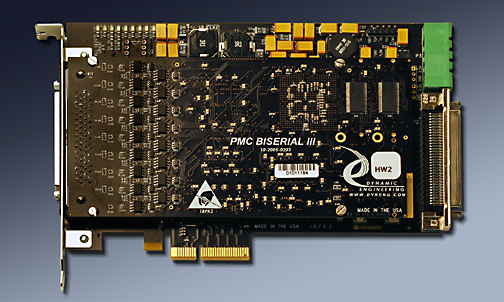
PCIeBPMCX1 shown loaded with a Dynamic Engineering PMC BiSerial III Module
Size
1/2 size PCIexpress card with 4 lanes interconnected to the Bridge. 1-4 lane operation. 4+ lane connector compatible.
PMC compatible slots
1 PMC position provided. DMA capable
Clocks
PCI secondary bus can operate at PCI-X (133,100, 66, 50) or PCI(66, 50, 33,25) MHz. User switch or automatic selection clock selection.
PMC VIO
3.3V
Software Interface
Industry Standard Bridge register definitions. The bridge does not require any user set-up. PMC register definitions as defined by installed hardware. For superior DMA perfomance some Bridge settings should be enhanced. Dynamic Engineering Drivers [Linux and Windows] have this feature. Ask and we can share the registers, offsets and new values.
Power
Local power supplies provide +5(15A), +12, -12V(4A), +3.3V(15A) available to PMCs with adequate +12V input current. Supplies use industrial temperature components, and spreading power planes to manage the thermal load. It is recommended to use the FAN option for high power requirement PMC´s. User selectable power supply enable{on/off, delayed, not delayed] for 3.3V and 5V supplies.
3.3V and 5V power supplies capable of up to 15A continuous without additional cooling in lab environment. Adding a fan to position 2 reduces the temperature significantly - approximately 50 degrees C allowing for a wider operational temperature range. The max FET temperature was below 100C for the non-fan case and mid to upper 40s for the fan installed case. The max junction temperature of the FET is 150C. We used a case temperature limit of 100C to be conservative. A
3.3V and 5V power supplies capable of up to 15A continuous without additional cooling in lab environment. Adding a fan to position 2 reduces the temperature significantly - approximately 50 degrees C allowing for a wider operational temperature range. The max FET temperature was below 100C for the non-fan case and mid to upper 40s for the fan installed case. The max junction temperature of the FET is 150C. We used a case temperature limit of 100C to be conservative. A
midpointof 7.44A on 5V and 6.6A on 3.3V produced 65.8C on the 5V FET with no cooling [3.3V FET was 57.6C]. We can estimate that the card can handle the given load up to 50C with some margin. With lighter loads higher temperatures can be achieved without cooling. With cooling higher loads can be achieved at higher temperatures.
Thermal
PCIeBPMCX1 has cut-outs to support increased airflow over the PMCs component side. Optional fan(s) with two mounting positions per PMC position are available and recommended for many applications. Industrial Temperature components.
Interrupts
INTA, INTB, INTC, INTD routed to to Bridge and handled per PCIe convention. Most PMCs use one Interrupt level [INTA].
IO Interface
PMC Bezel IO supported at PCIe bracket. Jn4 "user IO" Differential, Impedance controlled, matched length traces from Jn4 to SCSI connector.
Specification
PMC, PCI, and PCIe specification compliant
LED´s
+3V, +5V, +12V, -12V[with voltage monitoring] and Busmode 1 [present]
JTAG
PMC JTAG connections are tied to a labeled header. Add -JTAG to part number for this option to be installed.
Statement of Volatility
Reliability
25C GB 1,714,065 Hrs. [conservative value]
Weight
~4.7 oz typical, standard configuration. Add .65 oz. for two fans
Export Classification
EAR99, HTS:8537.10.9050
PCIeBPMCX1 Benefits
Speed
PCIeBPMCX1 offers PCI-X and PCI speeds at the PMC position
Price
Make use of existing PMC designs in PCIe applications without paying for the expense of a new design and layout. Quantity discounts are available.
Ease of Use
PCIeBPMCX1 is easy to use. A plug and play interface to the PMC site. The Bridge can be configured with the user switch on board. PCIeBPMCX1 is a Transparent Bridge. In most cases the switches can be left with the factory settings. The manual contains clear directions for switch options. Dynamic Engineering has developed routines for Windows and Linux applications to set the Bridge to an optimal configuration for DMA. Please contact Dynamic Engineering for the code to add to your system.
Availability
PCIeBPMCX1 is a popular board. We keep the default models in stock. We pre-build with the common devices installed, and then cllientize to your specific configuration. This method allows faster delivery on our more popular products while retaining the ability to have multiple client options.
Size
PCIeBPMCX1 is a 1/2 size PCIe board which conforms to the PCIe mechanical and electrical specifications. Eliminate mechanical interference issues. PCIeBPMCX1 can be used in all 1/2 and full length PCIe compliant slots.
PMC Compatibility
PCIeBPMCX1 is PMC compliant per the PMC specification [compliant per the IEEE 1386]. All Dynamic Engineering PMC Modules are compatible with the PCIeBPMCX1. All other PMC Modules which are compliant with the PMC specification are compatible with PCIeBPMCX1
PCIe Compatibility
PCIeBPMCX1 is PCIe compliant. PCIeBPMCX1 can be expected to work in any PCIe compliant backplane with 4+ lane connectors and 1/2 or full length card positions. PCIeBPMCX1 has been tested in multiple backplanes.
Part Number: PCIeBPMCX1
Ordering Options
- PCIeBPMCX1 Standard board - Standard Build, SCSI connector, standard processing.
Order combinations of the options by simply adding the extension(s) to your order request. - -FAN( ) Need additional cooling? order the PCIeBPMCX1-FAN() for a pre-installed 12V 5.2CFM fan(s) to maximize cooling and functionality of your card. The fan has been tested with high wattage prPMC devices.
Fan position 1 is closest to the PCI bezel. Valid Fan options include:
(1 or 1Rz) position 1 only low profile or rear mount.
(2 or 2Rz) position 2 only low profile or rear mount.
(1R) 8 CFM fan position 1 available as R mount only .
(2R) 8 CFM fan position 2 available as R mount only .
Any combination with at most 1 fan per position defined. - -ROHS Use ROHS processing. Standard processing is "leaded"
- -CC Option to add Conformal Coating
- -NC Order to receive a PCIeBPMCX1 with no SCSI connector installed.
- -5VXXX Order to receive a PCIeBPMCX1 with 5V supply forced to (replace XXX) No Delay [ND], Delay[DEL], Off[OFF] instead of user selectable
- -DDV Order the PCIeBPMCX1-DDV to receive a PCIeBPMCX1 with a vertical PC style "Disk Drive" connector installed for supplemental power. The "-DDV" option will allow an added 5A [60W] to be used on the card.
- -AP Order the PCIeBPMCX1-AP to receive a PCIeBPMCX1 with a high power connector installed for supplemental power. Standard 6 position PC style power connector. 3x12V, 3x GND. 13A per pin [rated]
Please note that the standard card without the -DDV, or -AP option will work in most situations. Many PMCs fit within the "gold finger" power budget.
If you are unsure of your power requirements, we recommend ordering with a Power Connector installed to support your future development, and eliminate needing to install at a later date.
PCIeBPMCX1 Drivers
Software Support for PCIeBPMCX1 is not needed. PCIeBPMCX1 has a transparent bridge, the drivers and application SW associated with the PMC will not need changing to use this carrier.
Please see the PMC Driver manual for the specifics of operating the installed device.
Please see the PMC Driver manual for the specifics of operating the installed device.